Excel upload and download
Many sites and works can be created or updated at once from an Excel file, and downloaded to be corrected and uploaded again. Only managers see these buttons.
| Button | Where | What it does |
|---|---|---|
| Scarica template (download template) | Site list | Downloads the empty template |
| Carica dati (upload data) | Site list | Reads a filled-in file, shows the preview and saves |
| Scarica cantieri (download sites) | Site list | Downloads the listed sites with their works |
| Scarica (download) | Site detail | Downloads that site with its works |
The template
Scarica template downloads the file Template cantieri Site Monitor.xlsx with three sheets:
- Istruzioni (instructions), first: how to fill in the file and, for every column, an example and a note;
- Cantieri (sites): one site per row;
- Lavori (works): one work per row, with the code of its site.
The columns marked with * are required. With one file you load sites and works.
Rules for filling it in
- Do not change the column headings.
- A code that already exists updates that site or work. An empty cell leaves the value as it is.
- In the Lavori sheet, the machine is given by its IMEI (the name of the device) or by brand and model, as Site Monitoring shows them, if no other machine has the same name.
- Each goal applies only to the machine types written in its note.
- A work already started does not change its excavation size or its passes; an ended work cannot be changed; the machine of a work cannot be changed.
- Dates can be Excel dates or text written as dd/mm/yyyy or yyyy-mm-dd. Required passes must be whole numbers.
- The machines are not loaded from the file: they are the ones of your fleet.
- The areas of sites and works are drawn afterwards on the map, from Modifica (edit).
Uploading a file
- Press Carica dati and choose the file (5 MB at most).
- Site Monitoring reads the Cantieri and Lavori sheets by their headings: upper or lower case and the
*do not matter, unknown columns are ignored and empty rows are skipped. - The Carica dati window shows the preview. Nothing is saved yet.
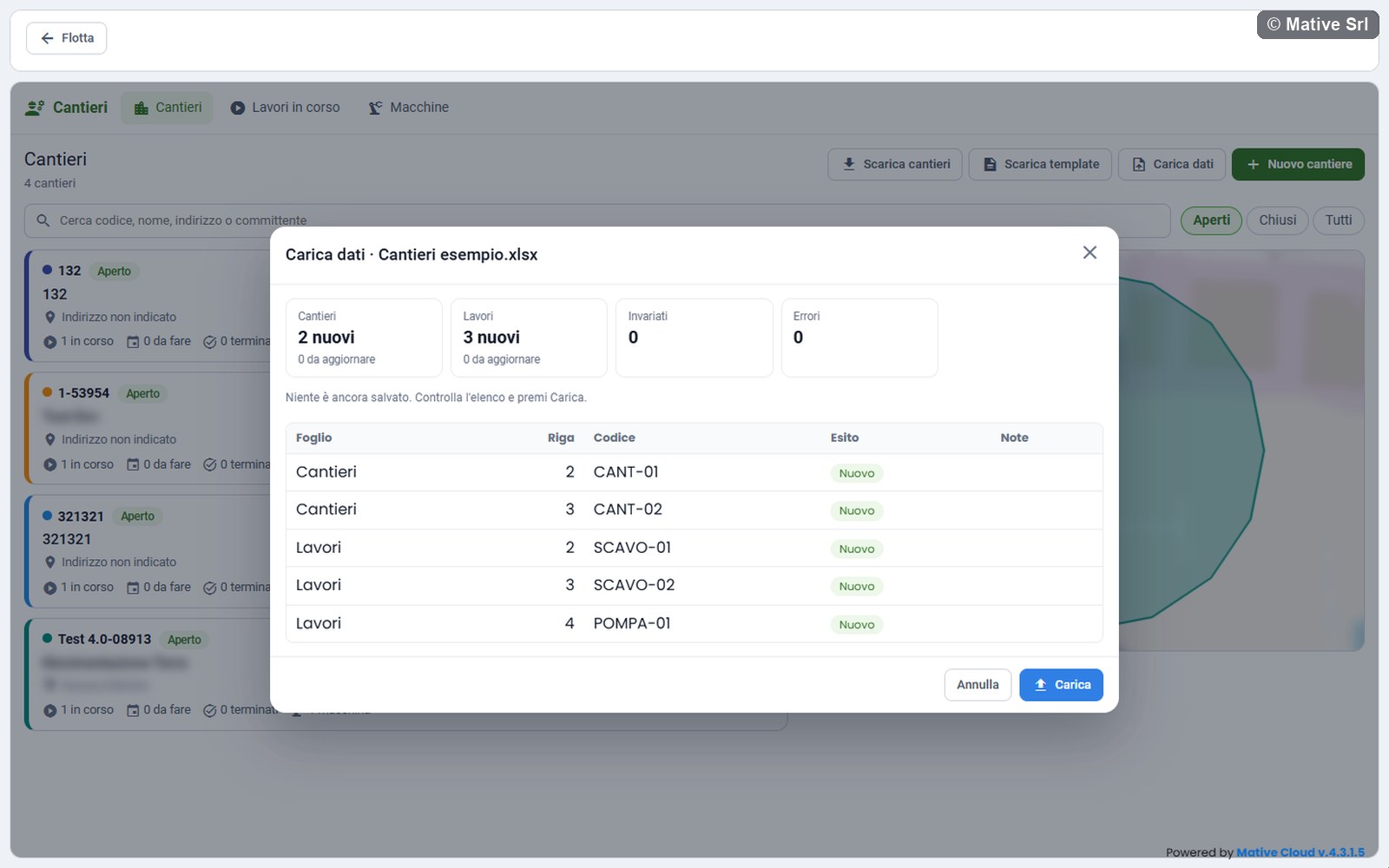
The preview shows how many sites and works are nuovi (new) and da aggiornare (to update), how many rows are Invariati (unchanged) and how many have Errori (errors). Below, the table lists every row with sheet, row number, code, result and notes, with errors first:
| Result | Meaning |
|---|---|
| Nuovo (new) | The row creates a site or a work |
| Aggiornato (updated) | The row changes an existing site or work |
| Invariato (unchanged) | The row is the same as what is already saved |
| Errore (error) | The row cannot be saved; the note says why |
- If there are no errors, press Carica (upload). A message confirms how many sites and works were loaded.
The saving is all or nothing: if a single row has an error, the Carica button does not appear and nothing is saved. Correct the rows with errors and upload the file again.
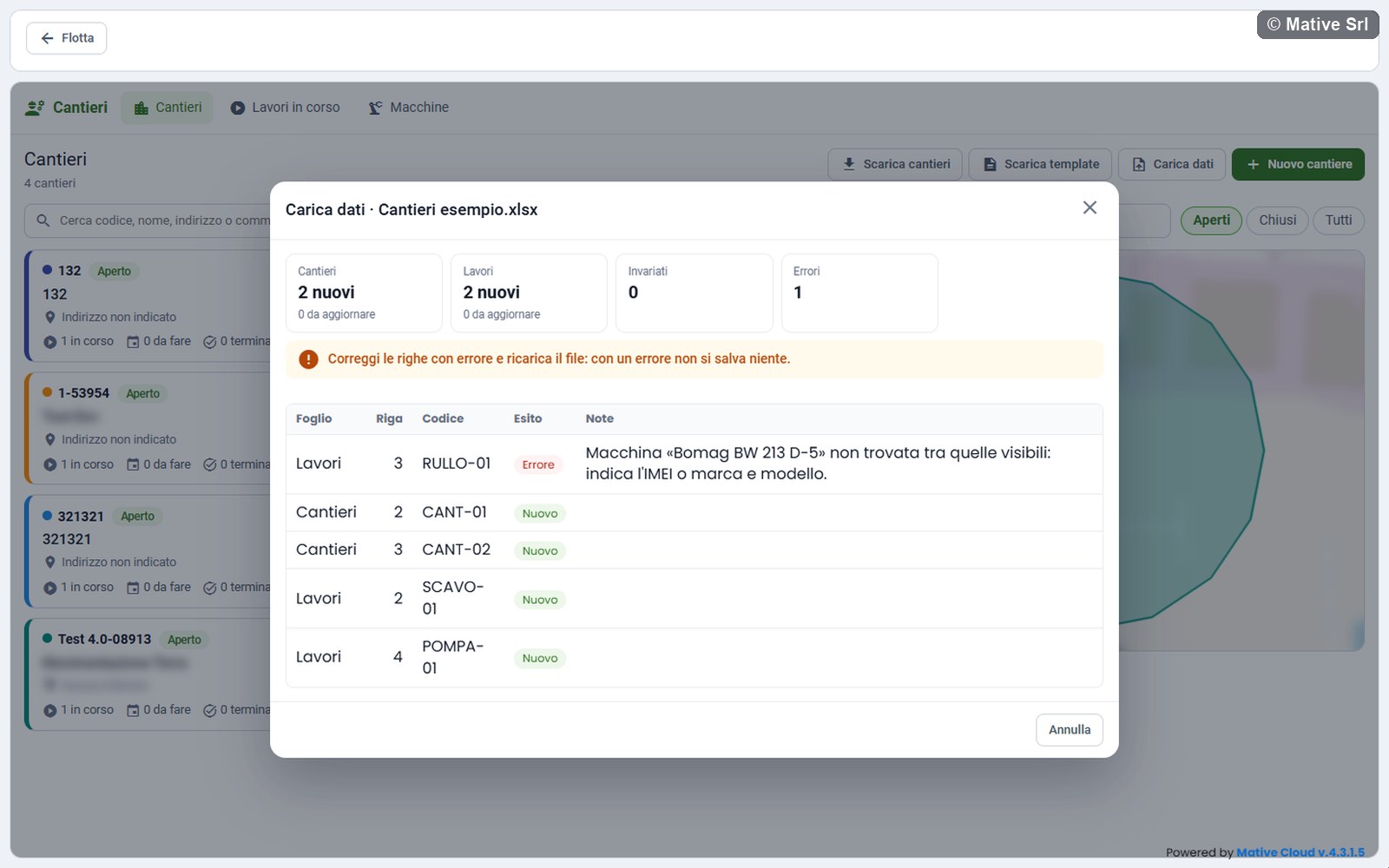
A file can contain up to 2,000 sites and 5,000 works.
Downloading sites
Scarica cantieri downloads the sites shown in the list, with the filter and the search on screen, in the file Cantieri Site Monitor followed by the date. Scarica in the detail of a site downloads only that site, in the file Cantiere followed by its code.
The file has the Cantieri and Lavori sheets with the data and all the works. Dates are Excel dates (dd/mm/yyyy). At the end of each sheet there are read-only columns, such as the status, which are ignored when the file is uploaded. The instructions are only in the template.
You can correct the downloaded file and upload it again with Carica dati: uploaded as it is, every row is Invariato.