Construction Sites: overview
Construction Sites (Cantieri in the interface) is the module of Site Monitoring that follows what each machine does on a construction site.
- A site (cantiere) has a code, a name, an address, a client, planned dates and an area drawn on the map.
- A site contains several works (lavori). Each work belongs to one machine and has the goals of its machine type: the volume to dig, the weight to move, the passes of the roller, the concrete to pump...
- While a work is in progress, Mative Cloud calculates its KPIs from the data of the machine: progress, engine hours, weighings, depths, roller passes, pumped concrete. The calculation goes on even with the page closed.
How to open it
- Get your Account ID: contact us and we will enable the module for your company.
- On the Site Monitoring home page, click Cantieri in the buttons at the top.
The works of a single machine are also in the Lavori (works) tab of its page.
If the module is not active for your company, the page says so: contact Mative to activate it.
The module interface is in Italian. In this guide, labels are written as they appear on screen, followed by their English meaning in parentheses.
Pages
The bar at the top of the module opens three views: Cantieri (sites), Lavori in corso (works in progress) and, for managers, Macchine (machines).
| Page | What you do there |
|---|---|
| Site list and site detail | Find a site on the list or on the map, open its detail, create, edit, close and reopen a site |
| Works and KPIs by machine type | Create a work with its goals, start and end it, follow its KPIs, the works in progress and the Lavori tab of the machine |
| Excel upload and download | Create and update many sites and works from an Excel file, and download them |
Statuses
| Site | Meaning |
|---|---|
| Aperto (open) | Works can be created and started |
| Chiuso (closed) | No work can be started until the site is reopened |
| Work | Meaning |
|---|---|
| Pianificato (planned) | Created, not started yet |
| In corso (in progress) | Started: the KPIs are updated from the data of the machine |
| Terminato (ended) | Ended: the final values stay on record and the work can no longer be changed |
Machine types
The type of a machine decides the goals of its works, what is measured and which commands the machine receives.
| Type | What is measured |
|---|---|
| Escavatore (excavator) | Excavated volume, buckets, depth |
| Pala con pesa (loader with scale) | Weighings, moved weight by material |
| Pesa a ponte (weighbridge) | Weighings, moved weight |
| Rullo compattatore (roller) | Passes, coverage of the area, finished area |
| Betonpompa (concrete pump) | Pumped concrete |
| Sollevatore telescopico (telehandler) | Load, boom position, load chart |
| Mulino frantumatore (crusher) | Production of stabilised and crushed material |
| Macchina generica (generic machine) | Position, engine hours, speed limit |
The details of each type are in Works and KPIs by machine type.
Macchine view
Managers set the type of each machine in the Macchine (machines) view: choose the type, tick the options and press Salva (save).
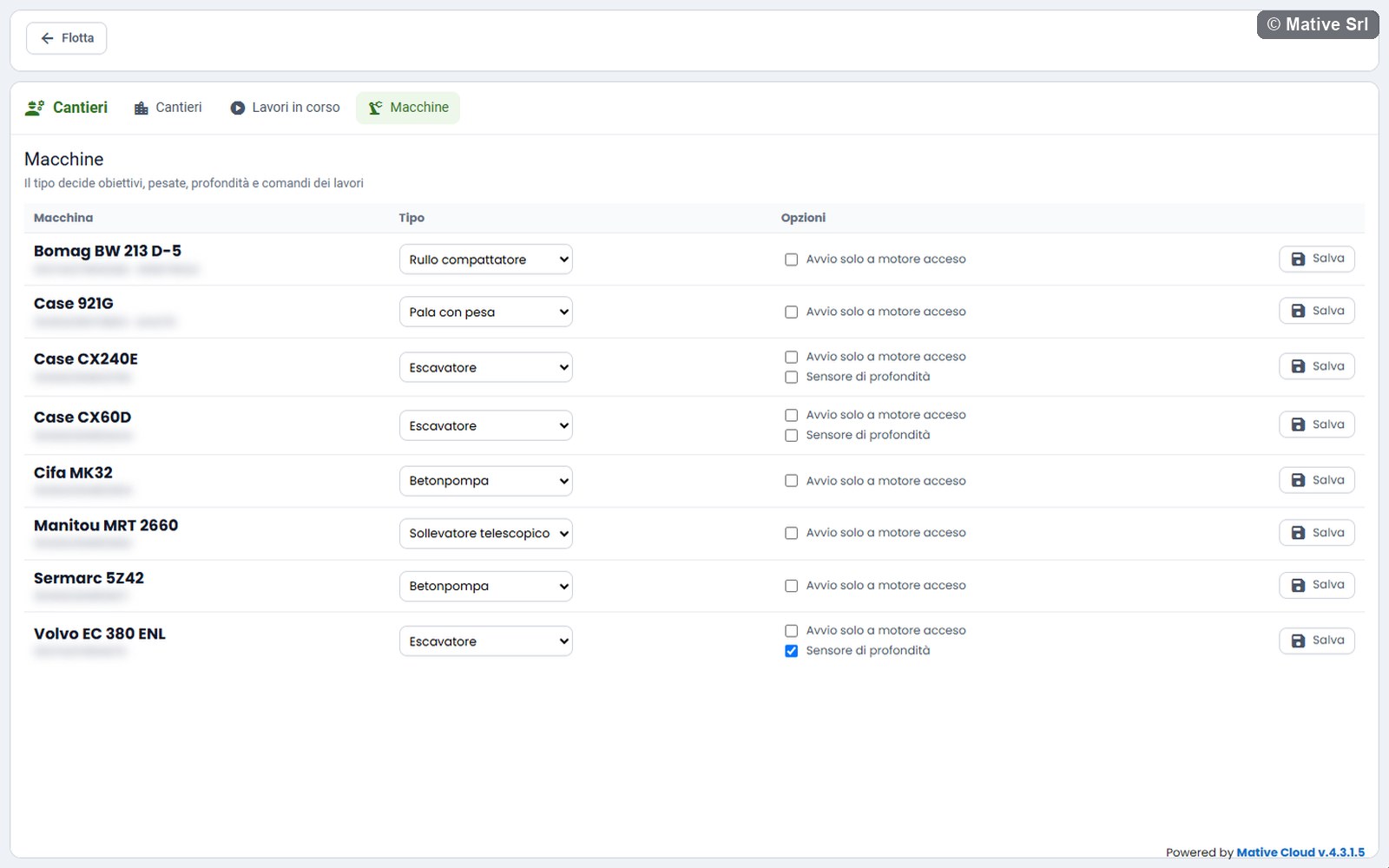
- Avvio solo a motore acceso (start only with the engine on): the works of the machine start only if the engine is on. Off by default.
- Sensore di profondità (depth sensor), for excavators: the machine has a depth sensor, so its works record depths and need the excavation size before they start.
The type cannot be changed while the machine has a work in progress.
Roles
| Role | What they can do |
|---|---|
| Managers (company administrator and customer administrator) | Everything: sites, works, machine types, Excel upload, operations and commands |
| Operators | On their own machines: start and end works, record weighings and depths, set the excavation size, send the emergency block. They see only the sites with works of their machines. |