Works and KPIs by machine type
A work (lavoro) is what one machine has to do in a site: dig a trench, move material, roll a road, pump concrete. Its goals and its KPIs depend on the machine type.
New work
Managers create a work in two ways:
- from the site detail, with Nuovo lavoro (new work): you choose the machine;
- from the Lavori tab of the machine, with Nuovo lavoro: you choose the site among the open ones.
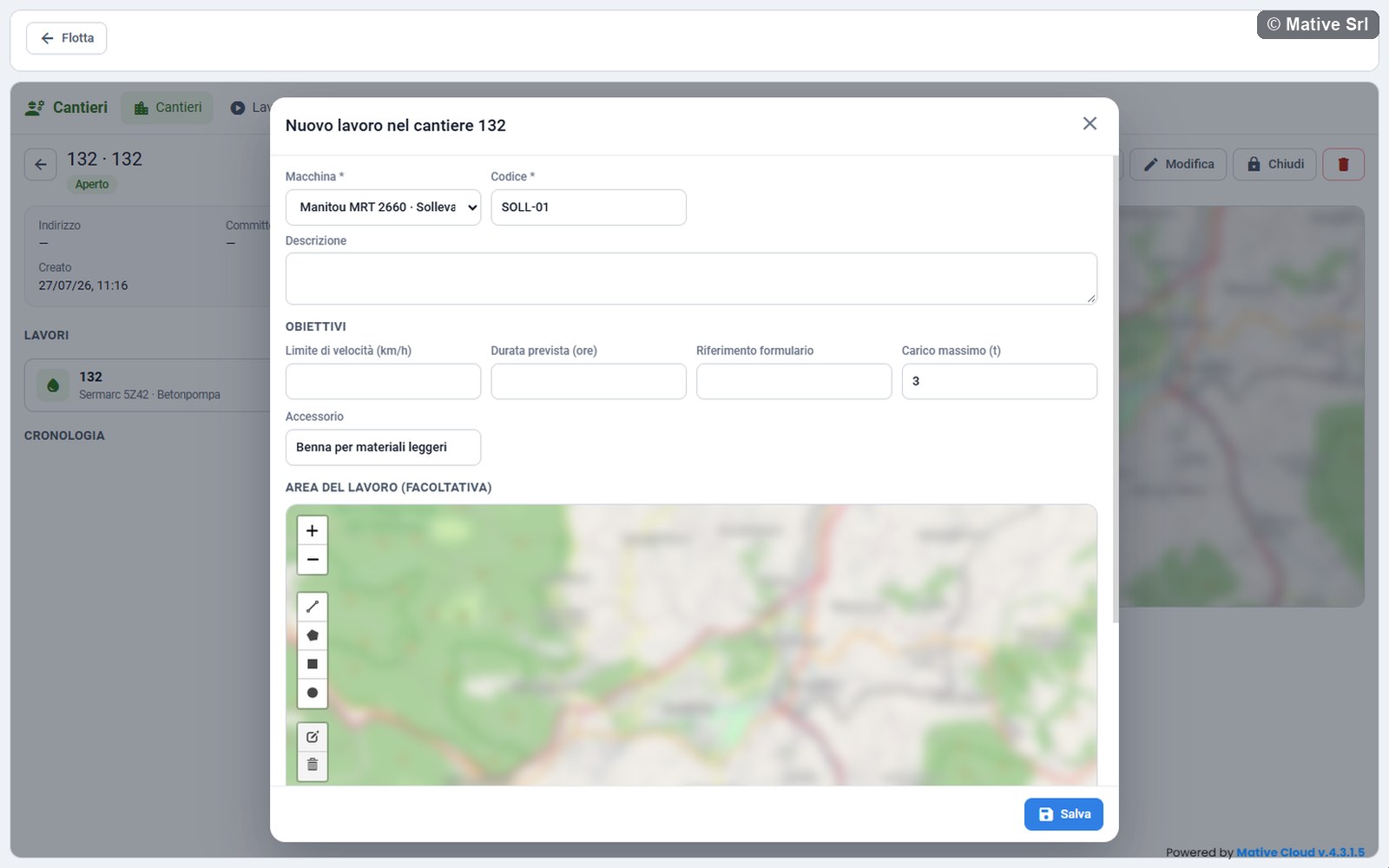
The window has these fields:
| Field | Note |
|---|---|
| Macchina (machine) * | The machine, with its type. It cannot be changed afterwards. |
| Cantiere (site) * | Only from the machine tab: the open sites |
| Codice (code) * | Required, unique in the site |
| Descrizione (description) | |
| Obiettivi (goals) | The goals of the machine type (see below) |
| Area del lavoro (facoltativa) (work area, optional) | The area of the site is shown in grey. Draw an area only if the work takes up part of the site, for example the trench or the road to be rolled: passes, exits from the area and the work map use it. If you draw nothing, the area of the site applies. |
Press Salva (save): the work is created as Pianificato (planned) and its page opens.
Goals by machine type
Every type has Limite di velocità (km/h) (speed limit), Durata prevista (ore) (planned duration, hours) and Riferimento formulario (waste form reference). In addition:
| Type | Goals |
|---|---|
| Escavatore (excavator) | Larghezza scavo (m), Lunghezza scavo (m), Volume da scavare (m³) (width, length and volume of the excavation) |
| Pala con pesa, Pesa a ponte (loader with scale, weighbridge) | Peso da movimentare (kg) (weight to move) |
| Rullo compattatore (roller) | Passate richieste (required passes): a whole number, 4 if left empty |
| Betonpompa (concrete pump) | Calcestruzzo da pompare (concrete to pump), in the unit of the pump counter |
| Sollevatore telescopico (telehandler) | Carico massimo (t) (maximum load), Accessorio (attachment), chosen from the list or typed |
| Mulino frantumatore (crusher) | Inerti da produrre (t) (aggregates to produce) |
Editing a work
Modifica (edit) opens the same window.
- Managers change code, description, goals and area. Excavation size and required passes cannot change after the work has started.
- Operators can only set the excavation size, in the Dimensioni dello scavo box of a planned excavator work with a depth sensor (see below).
- An ended work cannot be changed.
Starting and ending
Avvia (start) starts a planned work. The work starts only if:
- the site is open;
- the machine has no other work in progress: a machine has at most one work in progress at a time;
- the engine is on, if the machine has the option Avvio solo a motore acceso (start only with the engine on);
- for an excavator with a depth sensor, width and length of the excavation are set;
- for a telehandler, the machine has confirmed its attachment;
- for a concrete pump and a crusher, the counter of the machine can be read.
When it starts, the work reads the engine hours and the counters of the machine. If a condition is missing, a message says which one.
Termina (end) asks for confirmation and ends the work: it reads the final values, sends the end command where the machine type has one and switches off the automatic depth recording.
A planned or ended work can be deleted with the bin. A work in progress cannot be deleted.
Work page
At the top: code and machine, status, machine type and the site, which you can click to open. The buttons are Avvia or Termina, Modifica and the bin.
On the left:
- KPIs, always present: Avanzamento (progress towards the goal), Durata (duration since the start), Ore motore (engine hours since the start), Posizione (position: Nell'area, inside the area, or Fuori area, outside the area). Riferimento formulario and Limite di velocità appear when they are set. Then the KPIs of the machine type.
- Live values of the machine: those of its type, Motore (engine, Acceso or Spento) and Velocità (speed).
- The actions of the type: weighings, depth, emergency block.
- The tables Pesate (weighings), Profondità registrate (recorded depths) and Comandi alla macchina (commands to the machine), when they have rows. The Origine (source) column says whether a value comes Dalla macchina (from the machine) or is Automatica (automatic). The Esito (result) column of the commands shows Inviato (sent), Solo registrato (recorded only, not sent) or Non riuscito (failed).
- Cronologia (history): creation, start, end, weighings, depths, commands, and when the machine leaves or re-enters the area (Macchina fuori dall'area, Macchina rientrata nell'area).
On the right, the map with the area of the work, in the colour of its site, and the position of the machine.
While a work is in progress, its KPIs are updated every 30 seconds with the page open. Mative Cloud keeps calculating them even when nobody has the page open.
KPIs by machine type
Excavator
| KPI | Meaning |
|---|---|
| Scavato (excavated) | Excavated volume in m³ and number of buckets (bennate) |
| Profondità (depth) | Maximum and average depth of the recorded digs |
| Scavo previsto (planned excavation) | Width × length and volume to dig |
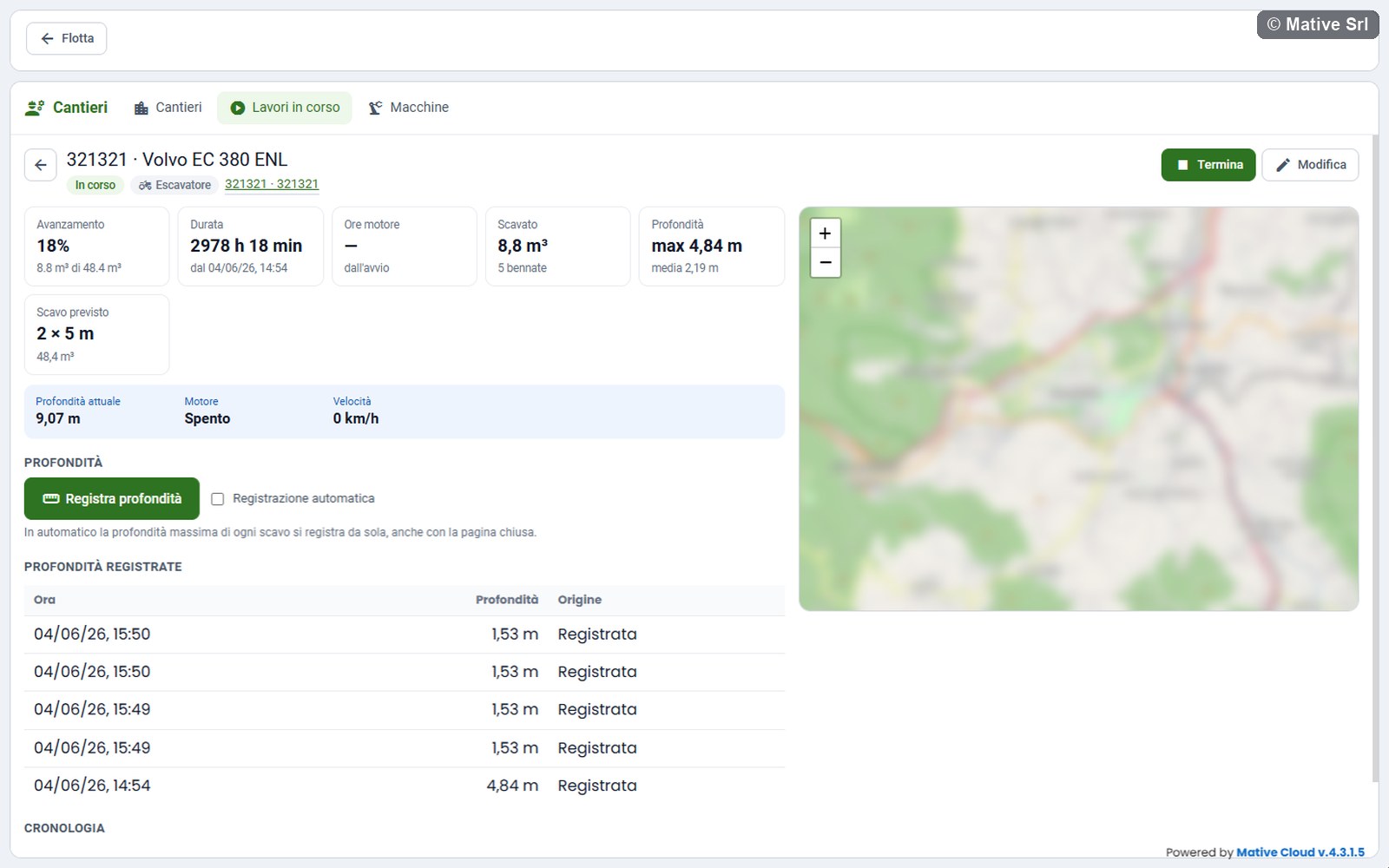
The live value Profondità attuale (current depth) comes from the depth sensor. The excavated volume is an estimate: number of buckets × volume of the bucket, 1.75 m³ by default.
With a depth sensor the work has a Profondità (depth) section:
- Registra profondità (record depth) records the current depth;
- Registrazione automatica (automatic recording) records by itself the maximum depth of every dig, even with the page closed. A dig starts when the bucket goes deeper than 0.5 m and ends when it comes back above 0.2 m (default values).
Before the start, a planned work with a depth sensor shows Dimensioni dello scavo (excavation size): Larghezza (m), Lunghezza (m), Volume da scavare (m³) and Salva dimensioni (save size).
Roller
| KPI | Meaning |
|---|---|
| Copertura (coverage) | Share of the cells touched by the roller that have the required passes |
| Passate richieste (required passes) | The goal, with the highest number of passes reached |
| Area finita (finished area) | m² with the required passes, and how many times the roller re-entered the area |
The area of the work is divided into cells of 2.5 m (default value). Every time the roller enters a cell, that cell gets one more pass. Only the positions inside the area of the work count: transfers outside do not.
The map of the work shows the map of passes: the track of the roller, coloured piece by piece with the passes of its cell.
| Colour | Passes |
|---|---|
| Red | 1 pass |
| Orange | 2 passes |
| Yellow | 3 passes |
| Green | 4 passes |
| Blue | More than 4 passes |
| Grey | Outside the area |
The Passate (passes) legend marks the required number of passes with ✓. A green dot marks the start of the work (Inizio lavoro), a red dot the last position (Ultima posizione). Hover over the track to see passes and time. The map is updated together with the KPIs.
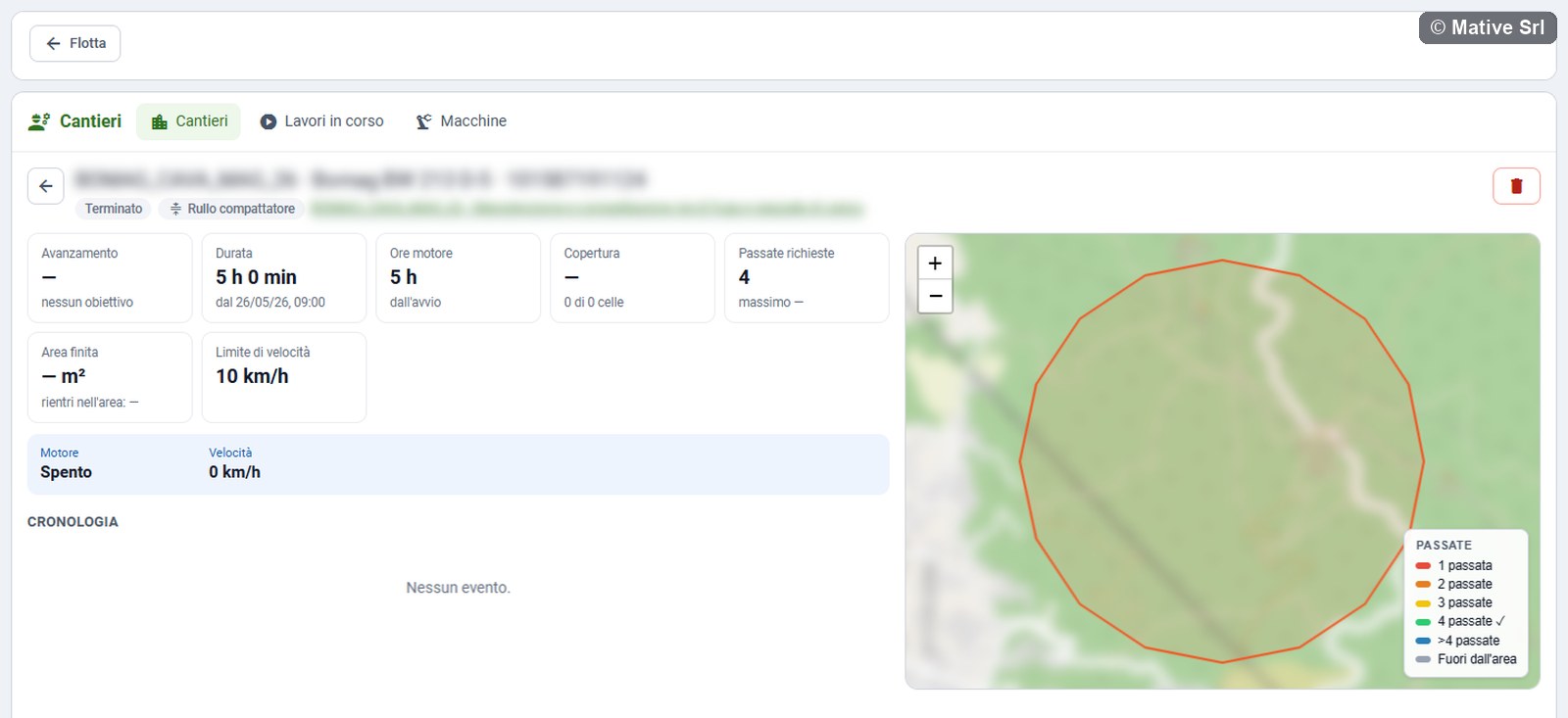
When 90% of the area is covered (with at least 20 cells touched), the roller receives a signal: in the commands table it appears as Copertura raggiunta (DOUT1 per 10 s) (coverage reached). At the end of the work it receives Fine lavoro (DOUT1 spento) (end of work). The signal is sent once per work.
Telehandler
Live values: Carico (load), Carico ammesso (allowed load), Altezza braccio (boom height), Sbraccio (reach), LMI (load moment indicator) and Accessorio (attachment). Red warnings appear for Allarme di stabilità laterale (lateral stability alarm), Allarme di stabilità longitudinale (longitudinal stability alarm) and Carico oltre il massimo del lavoro (load over the maximum of the work).
KPIs: Carico massimo (maximum load) with the attachment, and Durata prevista (planned duration).
In the works of a telehandler, the top of the right column shows the load chart with the position of the boom:
- at the top, ATT. (current load), Sbraccio (reach), Altezza (height), Angolo (angle) and LMI;
- the chart is the one of the maximum load of the work, rounded between 1 and 6 t, with maximum reach and height. If the work has no load, the chart of 3 t is shown with (carico lavoro non impostato) (work load not set). When the load of the work changes, the chart changes too;
- the boom ends in a green dot inside the chart and a red one outside, with the warning Posizione fuori inviluppo (position outside the envelope);
- with the machine working (engine running, operator seated and a load), the warning LMI appears from 90%.
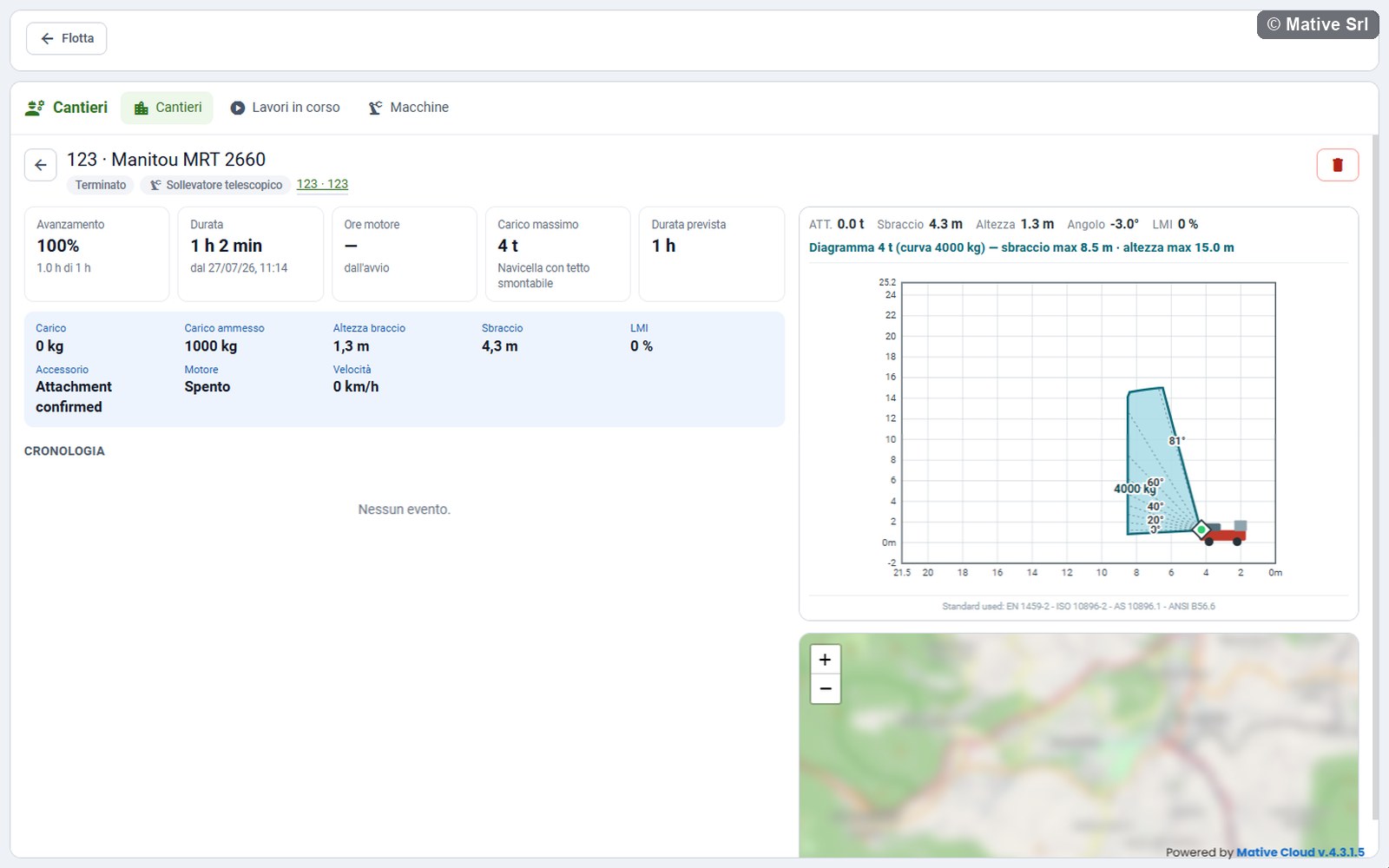
The load chart is a visual aid. It does not replace the load chart of the manufacturer or the safety devices of the machine.
Machines with a scale
For Pala con pesa (loader with scale) and Pesa a ponte (weighbridge):
| KPI | Meaning |
|---|---|
| Movimentato (moved) | Total weight in tonnes and number of weighings |
| One KPI per material | Weight of each material in tonnes, and the volume in m³ when the material has a density |
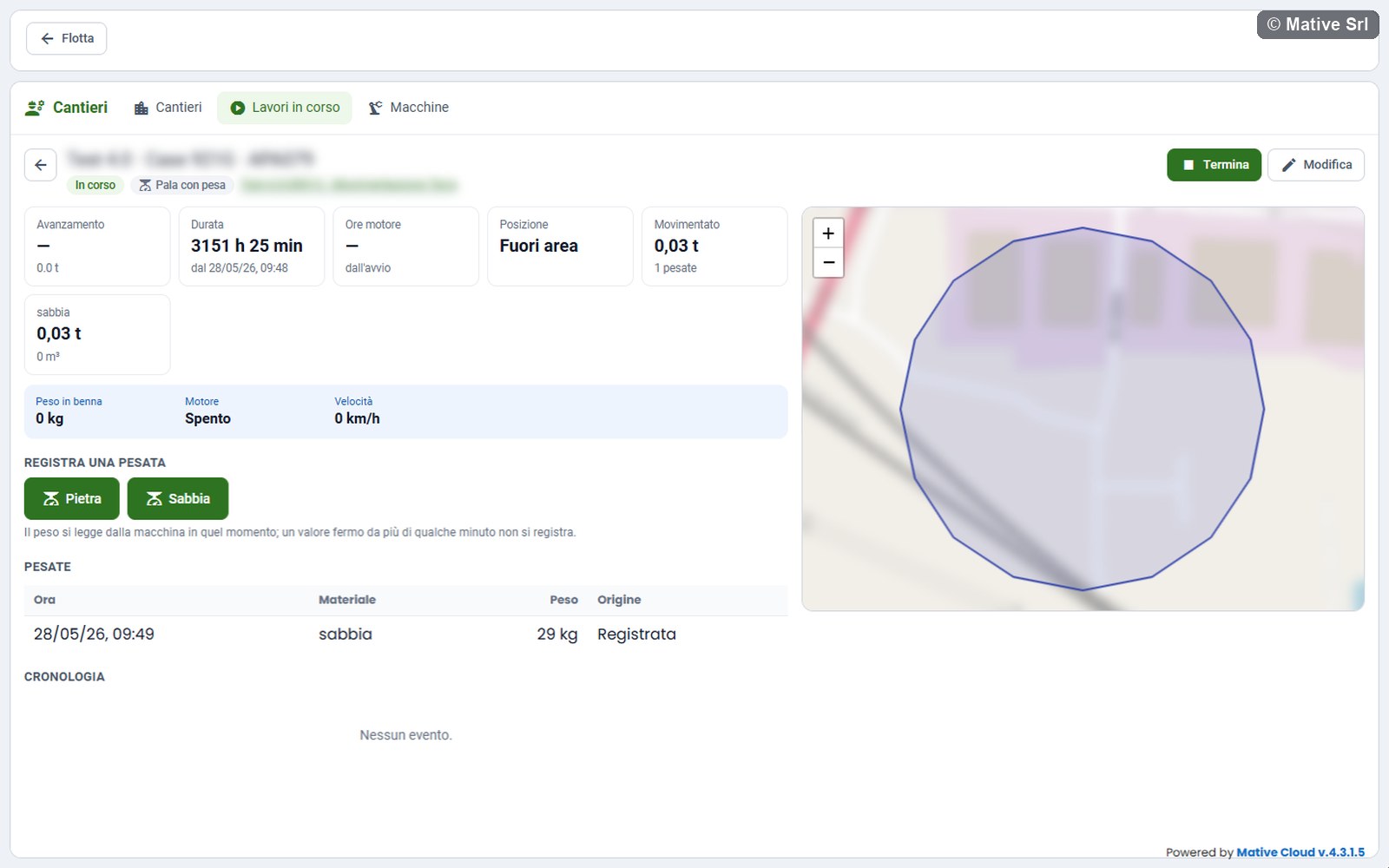
The live value is Peso in benna (weight in the bucket) or Peso sulla pesa (weight on the scale).
To record a weighing, under Registra una pesata (record a weighing) press the button of the material, for example Pietra (stone) or Sabbia (sand), or Registra peso (record weight) when the machine has no materials. The weight is read from the machine at that moment: a value that has not changed for more than a few minutes is not recorded. The default densities are 2,500 kg/m³ for stone and 1,600 kg/m³ for sand.
Concrete pump
Pompato (pumped) shows the concrete pumped since the start, against the goal. The live value is Contatore pompato (pump counter).
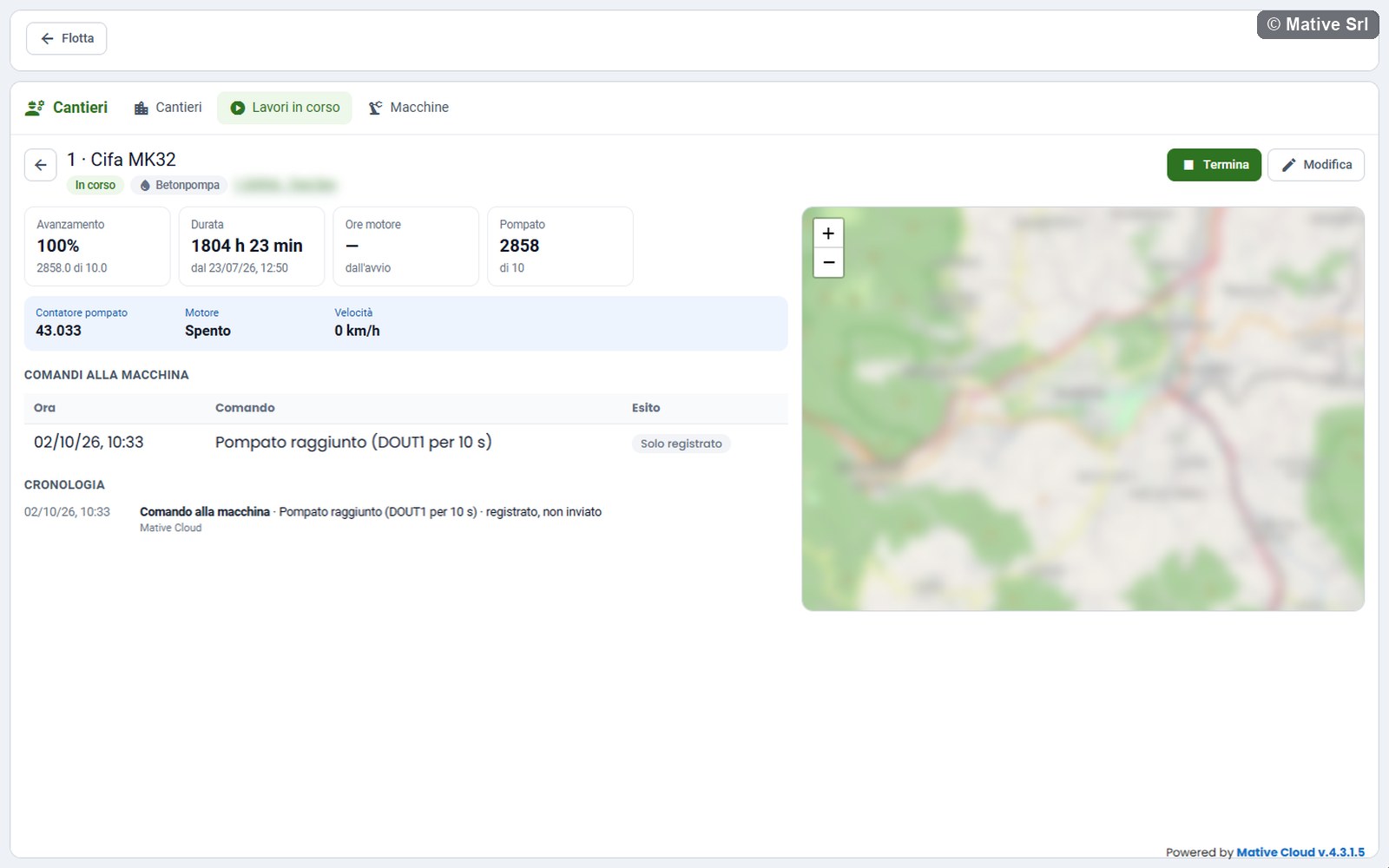
At 90% of the goal the pump receives a signal, shown as Pompato raggiunto (DOUT1 per 10 s) (pumped amount reached). At the end of the work it receives Fine lavoro (DOUT1 spento).
Crusher
Prodotto (produced) shows the tonnes produced since the start, split into stabilizzato (stabilised) and frantumato (crushed). The live value is Produzione (contatore) (production counter).
Generic machine
The common KPIs (progress, duration, engine hours, position) and the goals of every type: speed limit, planned duration and waste form reference.
Emergency block
In a telehandler work in progress, the Sicurezza (safety) section has the Blocco di emergenza (emergency block) button. After a confirmation, the command is sent to the machine and recorded in the Comandi alla macchina table and in the history. Managers and the operators of the machine can send it.
The trackers have a safety measure: the engine lock is activated only when the engine is off.
Works in progress
The Lavori in corso (works in progress) view lists the works of all sites in two groups, In corso (in progress) and Da fare (to do), with the count at the top. Search by work or site (Cerca lavoro o cantiere).
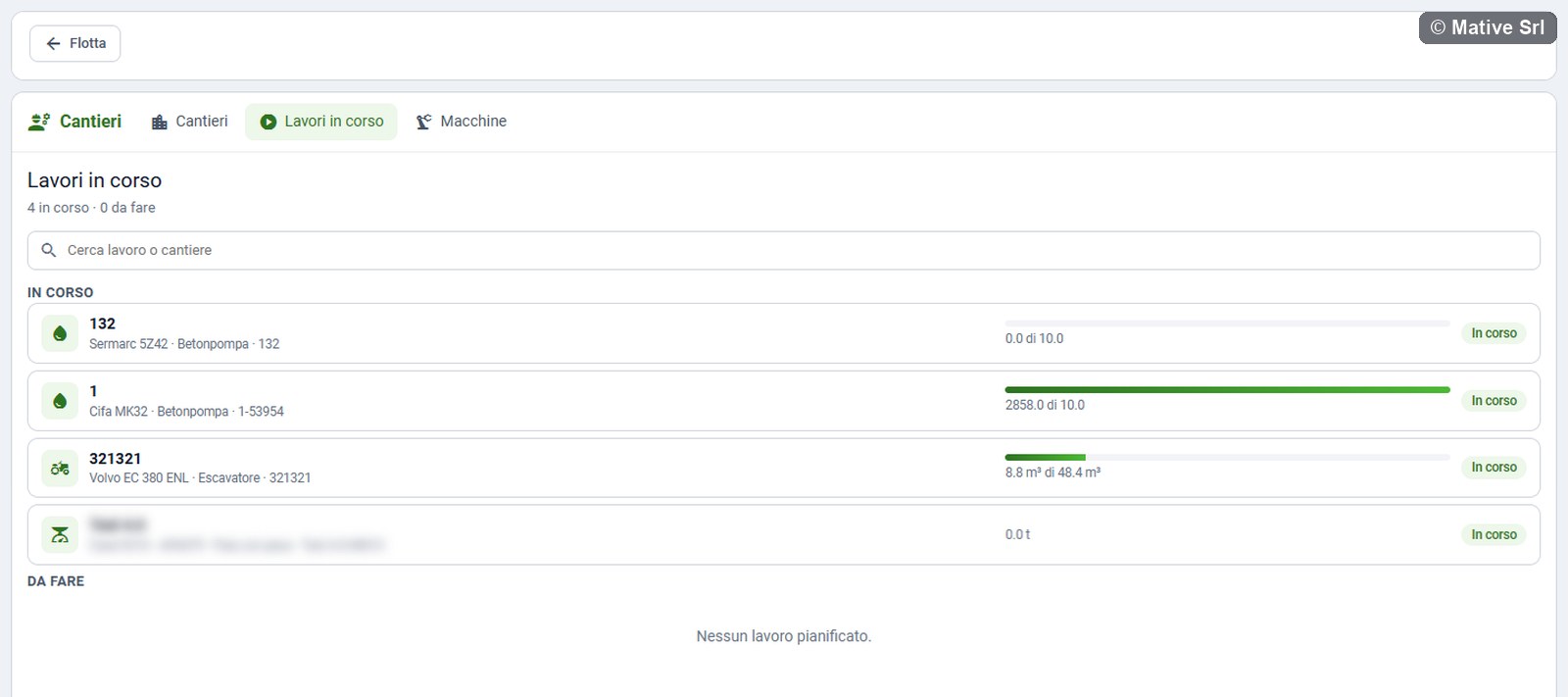
Each row shows code, machine, type, site, progress and status. Click a row to open the work; the back arrow returns to the list.
Works tab of the machine
The Lavori (works) tab of a machine page shows only the works of that machine: In corso, Da fare and Ultimi terminati (last ended). It has no bar with the other views and no links to other sites or machines.
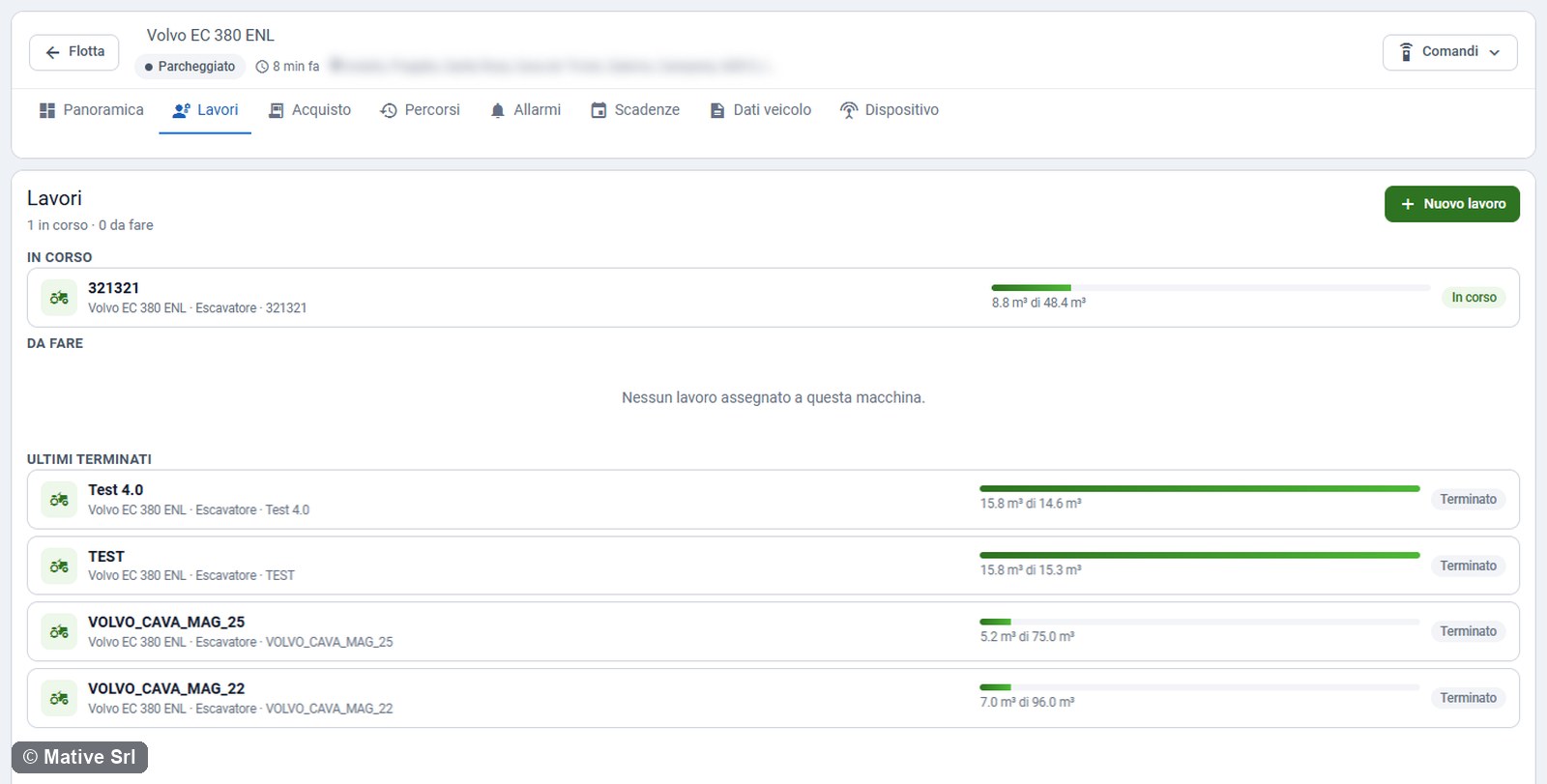
Managers create a work for the machine here with Nuovo lavoro, choosing an open site. If there is no open site, the message asks to create one first from the Cantieri page.