Alarms, deadlines and device
These pages open from the tiles of the home or from the tab bar. They all start with the vehicle header: plate, model, status, time of the last data, address and the Comandi (commands) menu for the engine lock.
Alarms
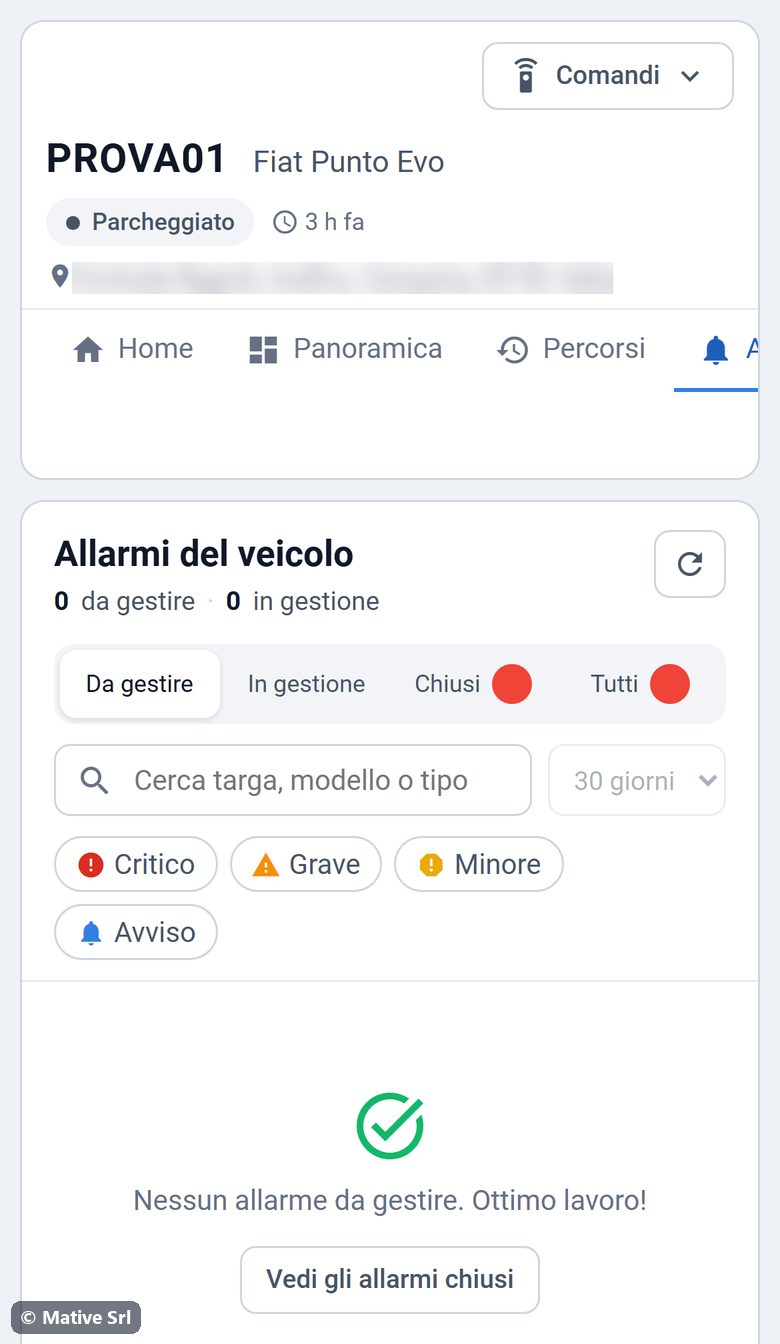
The Allarmi (alarms) page lists the alarms of your vehicle: crash, towing, speeding, battery or tracker problems.
- Tabs: Da gestire (to handle), In gestione (in progress), Chiusi (closed), Tutti (all).
- Filters: search, period (for closed and all alarms) and severity (Critico, Grave, Minore, Avviso).
- Tap an alarm to see its detail: description, map of the position, Google Maps and Raggiungi (directions), and the timeline.
- To handle an alarm, add a note if you want, then tap Prendi in carico (take charge) and, when it is solved, Chiudi (close).
The alarm types are the same as in Fleet Monitoring: see the list of alarm types.
Deadlines
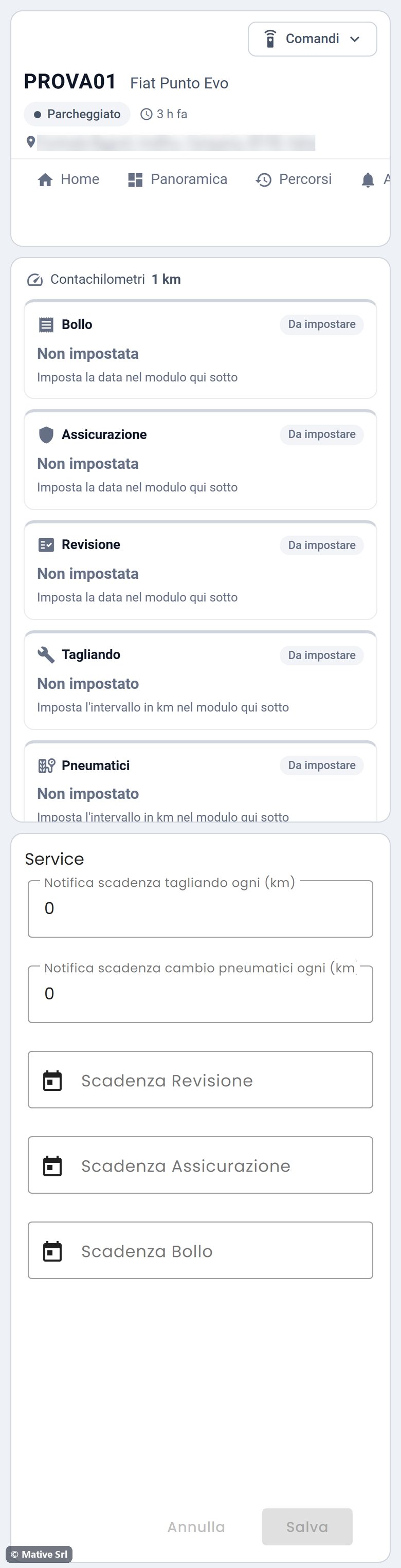
The Scadenze (deadlines) page shows road tax (Bollo), insurance (Assicurazione), inspection (Revisione), service (Tagliando) and tyres (Pneumatici) with a traffic light. Each card is In regola (fine), In scadenza (due within 30 days or 1,000 km), Scaduta (expired) or Da impostare (to be set).
To set a deadline, fill in the Service form under the cards and tap Salva:
- the dates of inspection, insurance and road tax;
- every how many km you want the service and tyre reminders.
The km-based deadlines use the odometer shown at the top of the page.
Vehicle data
The Dati veicolo (vehicle data) page contains the vehicle record: brand, model and plate, plus technical data such as chassis number, registration date, fuel type and colour. For brand, model, plate and photo you can also use the Il mio veicolo panel on the home.
Device

The Dispositivo (device) page shows the status of the tracker.
- Gestione Sconfinamento and Gestione Zona Vietata: the maps of the allowed area and of the forbidden zone, when they are set for your vehicle.
- Ultima comunicazione (last communication), Motore (engine), Blocco Motore (engine lock).
- Segnale GSM (mobile signal) and Batteria interna (tracker battery).
- Accelerometro (accelerometer), Storico Comandi (command history).
- Salute Batteria (battery health): vehicle battery voltage in the current month.
Overview

The Panoramica (overview) page shows the live values of the vehicle and the Posizione Real Time map (real-time position). Tap the map on the home to open it.
- Tiles: ignition (Quadro), speed, km today, odometer, vehicle battery, engine, mobile signal and satellites.
- Posizione Real Time: the position of the vehicle, updated as data arrives.
- Charts of the day: speed (Velocità), ignition (Storico Accensione), route (Storico Percorso, with the Replay button) and km driven (Km Parziali).